MCWX
- 4.6
- Rating
- 10.00K
- Installs
- Free
- Price

 Analysis by App-foxy
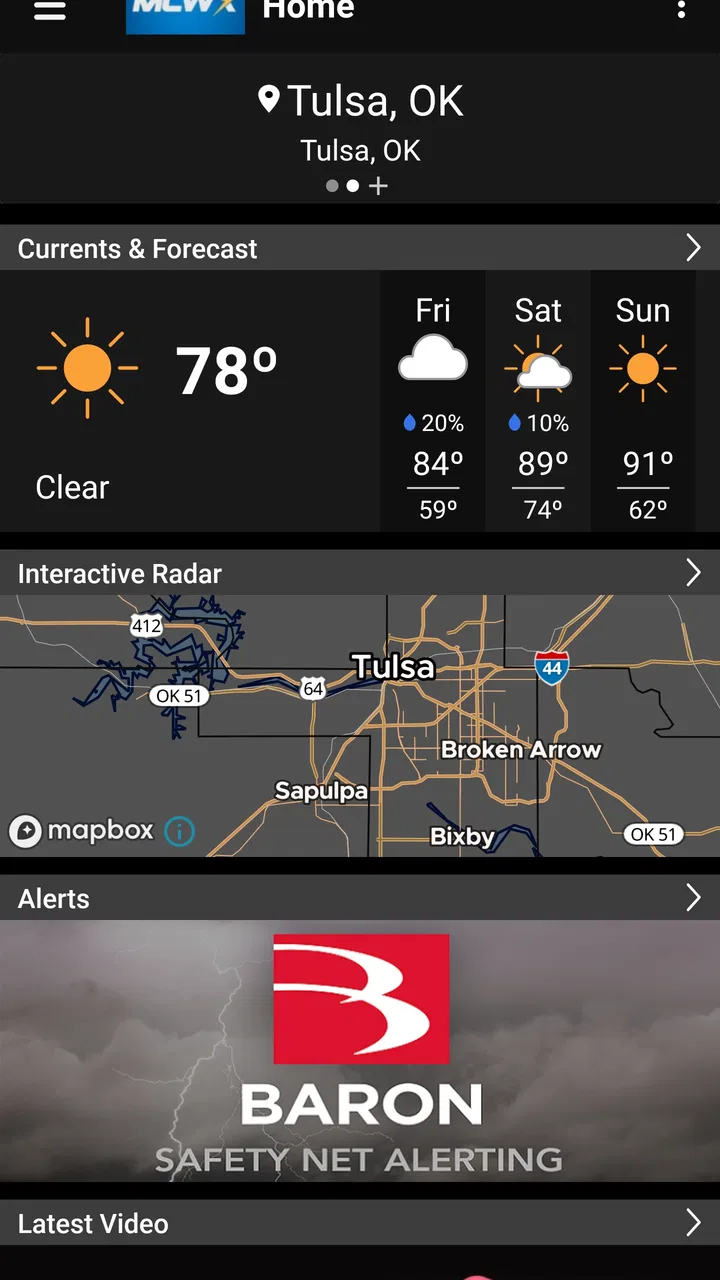
I started using MCWX as the kind of weather app I could leave available on a shared household phone without making everyone dig through a crowded national forecast service. It is a free weather app from MCWX, built around the latest weather for Eastern Oklahoma from Chief Meteorologist Mike Collier. That narrow focus is important: this is not trying to be an all-purpose weather dashboard for every city on earth. Its value comes from being local, direct, and easy to check when the question is simply, “What should we expect around here today?”
In my experience, the app makes the most sense for people who live in or regularly travel through Eastern Oklahoma and want a regional weather source close at hand. I would not choose it as my only tool for a long trip across several states, nor would I expect it to replace a dedicated emergency-alert service. But for a household deciding when to leave for work, whether children need rain gear, or if outdoor plans should move indoors, its local identity gives it a practical advantage over a generic forecast app.
How MCWX fits into a shared household routine
A weather app on a shared device has a slightly different job from one installed only for a single user. It needs to answer questions quickly, avoid unnecessary account confusion, and be understandable to someone who did not configure it. I found that MCWX suits this kind of casual handoff well because its purpose is immediately clear: open it when you need a regional weather check, rather than treating it as a personal data hub.
You May Also Like

 AccuWeather: Weather Radar
AccuWeather Review: A Quick, Clear Forecast for Everyday Decisions
For everyday plans, the best forecast is the one you can understand quickly. AccuWeather makes rain timing, radar, and local conditions easy to act on, with a few trade-offs.

 Hill Climb Racing
Why Hill Climb Racing Still Turns Crashes Into One More Run
A tiny car, a bumpy hill and one more upgrade: Hill Climb Racing keeps resurfacing because its simple chaos makes every near-miss feel personal.

 AliExpress - Shopping App
AliExpress Makes Global Shopping Feel Personal, but Shoppers Bear the Risk
AliExpress turns a global marketplace into a pocket-sized discovery engine. Its reach is useful, its shopping loop compelling, and its trade-offs easy to miss.

 Lords Mobile: Kingdom Wars
Lords Mobile Is a Kingdom-Building Routine, Not a Quick Match
A case-by-case verdict on the building, battles, device demands, and social commitments that make Lords Mobile rewarding for some players and exhausting for others.

 PDF Scanner app - TapScanner
TapScanner Makes Paperwork Easier to Capture, Check, and Share
TapScanner makes scanning with a phone feel less like a rescue operation and more like a dependable step in getting work done. Its capture tools are useful, though not flawless.

 Block Blast!
 Shows How Much a Puzzle Game Can Leave Out
A quiet grid game shows why puzzle players increasingly value instant clarity, repeatable skill and low-pressure play—and where the genre still needs to catch up.
More From Our News Desk
View All News


Picture a normal weekday morning. One person is preparing breakfast, another is looking for a jacket, and someone else is trying to decide whether a school pickup might be uncomfortable later. A shared phone on the kitchen counter can become the common reference point. Instead of each person checking a different source and comparing conflicting wording, the household can look at the same local weather presentation and make a decision together.
That does not mean the app turns a phone into a formal family coordination system. I did not treat it as a place for shared calendars, assigned alerts, or household messaging. Its usefulness is simpler and more realistic: it gives everyone a common weather starting point. For a household that values quick agreement over a long list of tools, that restraint is a strength.
The same arrangement can work for roommates, a small office, or a workshop where several people need to judge outdoor conditions. Leaving the app available on a tablet or spare phone can make it a practical reference during the day. The trade-off is that the device owner still has to keep the app accessible and make sure its location context is appropriate for the people using it.
What I would check before making it the household default
My first check would be geography. MCWX is specifically aimed at Eastern Oklahoma, so its local focus is a benefit only when that focus matches the household’s actual needs. If one person lives in another region, commutes far away, or frequently crosses a broad state boundary, a larger weather service may be more useful as a second source. The app’s regional character should be treated as a deliberate choice rather than a limitation to ignore.
I would also decide what “shared” means in practice. On a family phone, everyone may simply open the app when needed. On a device used by several adults, each person may want a different location or a more personalized forecast. Without assuming that MCWX provides separate household profiles, I would avoid changing settings casually on a communal device. A quick conversation about who manages the device prevents one person’s preference from confusing everyone else.
This is one of the less obvious trade-offs of a focused weather app: simplicity can make shared use easier, but it can also mean fewer layers between the app and the person using it. I like that for a common kitchen device. I would be more cautious if several people expected individualized weather views from the same installation.
Setup boundaries and the first-use experience
MCWX runs on Android devices using Android 7.0 or later, which covers a wide range of older phones as well as newer models. That makes it a reasonable candidate for a spare household handset that is no longer used for demanding apps. I appreciate this because a weather tool does not need to force a family to reserve its newest device for a basic daily task.
The app is free and rated for Everyone, so the practical barrier to trying it in a household is low. I would still introduce it differently depending on who is using the phone. With adults, I would explain that it is a regional weather reference. With younger users, I would frame it as one input for planning rather than a guarantee that conditions will stay unchanged.
That distinction matters especially when a child is using a shared device independently. A young user may see a forecast and assume it settles the question of whether it is safe to travel, play outside, or wait out a storm. I would teach them to check the app with an adult when conditions look serious, and not to treat a normal-looking screen as a substitute for direct safety guidance.
I also recommend a simple setup boundary: keep the app for weather, and keep personal accounts and household administration separate. There is no reason to mix a weather check with another person’s private device activity. If the phone belongs to a child, guest, or relative, the owner should remain responsible for the device’s general settings while the user only uses the weather information they need.
One useful habit is to establish a “read, then confirm” routine. The person checking MCWX reads the local outlook, says what they understand, and confirms the plan with whoever is responsible for the day. This is more reliable than assuming every household member interprets weather language in exactly the same way.
Coordinating plans without turning weather into an argument
The strongest household use case I found is coordination. Weather decisions often fail because people are looking at different apps, different locations, or different update times. A shared regional source can reduce that friction, particularly when the plan is flexible rather than safety-critical.
For example, imagine a family planning an outdoor meal after work. One person checks MCWX before leaving, another checks it again before shopping, and the household uses the latest view to decide whether to prepare outside or move the meal indoors. The app does not need to manage the plan itself. It simply gives the group a common reference that can make the conversation shorter and more grounded.
I would use the same workflow for walking a dog, washing a car, doing yard work, or deciding whether to carry an umbrella. Check the app at the moment the decision matters, then allow a little room for changing conditions. Forecast information is most helpful when it informs a choice, not when it becomes a promise that the day will unfold exactly as expected.
A practical tip is to avoid passing around a vague message such as “the weather looks bad.” Instead, say what decision the information affects: “We should leave earlier,” “The outdoor activity needs a backup,” or “Let’s bring another layer.” This makes the app useful to people who did not personally look at the screen and reduces the chance that a forecast becomes exaggerated as it travels through the household.
Another worthwhile habit is to compare the app’s regional view with the actual conditions outside before committing to a long activity. That is not a criticism of MCWX; it is good weather-app discipline. Local conditions can change, and a forecast that is adequate for a routine errand may not be enough for a long drive, outdoor work, or a situation where severe weather is possible.
Trust, age context, and responsible use
The Everyone content rating makes MCWX approachable for a broad household audience, but an age rating does not decide how much responsibility a particular user should have. A child can use a weather app comfortably while still needing an adult to interpret uncertainty and make safety decisions. I see that as a household rule rather than a missing app feature.
For older relatives, the app’s focused purpose can also be helpful. A person who finds large weather platforms overwhelming may prefer opening one regional app instead of sorting through maps, news, shopping prompts, and unrelated recommendations. I would place it where the person normally checks the phone, then show them one or two repeatable actions rather than trying to explain every possible weather scenario.
Trust also depends on knowing when the app is not enough. I would not ask a child to use MCWX as the sole basis for deciding whether to travel during dangerous conditions. I would not use a single forecast screen as the only preparation for a major outdoor event. In those situations, the responsible adult should consult the most appropriate official or emergency information available for the circumstances.
For ordinary planning, however, the app can support healthy independence. A teenager can check conditions before choosing clothing or packing for practice, while a parent still sets the boundaries around travel and severe weather. A roommate can check the local outlook before opening windows or planning yard work without needing access to anyone else’s accounts.
That balance is where I think MCWX works best: it supports decisions without pretending to own them. It gives a household a shared point of reference, but it does not remove the need for judgment, communication, or awareness of changing conditions.
How it compares with broader weather alternatives
The usual alternative is a broad weather app that covers many locations, adds radar layers, offers extensive customization, and may connect weather to notifications or other services. Those apps can be better when you travel often, monitor several places, or want a detailed meteorological toolkit. They may also be more suitable for someone who wants a single app to follow weather across a large region.
MCWX takes the opposite approach. Its identity is tied to Eastern Oklahoma and to the local weather perspective associated with Chief Meteorologist Mike Collier. That makes it easier to understand why someone would open it, especially when the household’s daily life is centered in that area. I would choose it over a sprawling alternative when speed and regional relevance matter more than a long menu of controls.
The trade-off is that a focused app may not satisfy users who want one interface for home, work, relatives in other states, and upcoming travel. I would also avoid recommending it as the only weather tool for someone who expects extensive cross-country planning. In that case, a broader service is the better primary option, with MCWX remaining useful for the Eastern Oklahoma part of the trip or routine.
There is also a difference in how people trust information. Some users prefer a local weather voice because regional context feels more relevant to their decisions. Others prefer comparing several models, maps, and providers. MCWX is better suited to the first group. If you enjoy exploring layers of weather data, you may find its focused role too narrow; if you want a straightforward local check, that same focus may be exactly what you need.
Performance expectations and practical friction
MCWX has reached version 6.7.1.1304, and its presence on Android makes it easy to consider for both current and older compatible devices. I see that broad compatibility as useful for shared hardware, but I would still keep expectations realistic. A weather app is only convenient if the phone is charged, connected when updates are needed, and easy for the intended users to reach.
The largest friction is not something I would solve by adding more features. It is the possibility of relying on a regional app outside its intended area or treating a quick forecast check as a complete safety plan. Households should decide in advance which situations call for a second source. That small rule protects the app from being asked to do a job it was not designed to handle.
I would also keep the app’s role visible to everyone using the device. If the household has several weather apps installed, label the routine mentally: MCWX for the Eastern Oklahoma local check, another service for broader travel or specialized monitoring. This avoids the common problem where people open whichever icon they recognize and assume all apps answer the same question.
The app’s free price is another reason it is easy to test without commitment. A household can try it on an appropriate device and decide whether its local focus fits daily routines. Since it is not a paid purchase, the decision is less about financial risk and more about whether the regional scope and shared-use habits match the household.
Who should install it, and who should skip it
I would recommend MCWX to an Eastern Oklahoma household that wants a simple local weather reference, especially if several people share a phone or tablet and need a common view before making everyday plans. It is also a sensible choice for someone who dislikes overloaded weather apps and prefers a focused regional identity.
I would be more selective for frequent travelers, people who need several saved locations, or users who want highly detailed weather analysis in one place. They may be happier with a broader weather platform. I would also advise against making any single app the only source for serious weather decisions, regardless of how convenient it is for normal planning.
For a family, the best arrangement is usually modest: install it on the device people actually use, explain its Eastern Oklahoma focus, agree on who handles serious weather decisions, and use it as a shared starting point for clothing, errands, and outdoor plans. That workflow gives children and guests useful access without handing them responsibility beyond their age or role.
The app’s rating of 4.6 from more than a hundred ratings suggests that it has found an audience, while its install count of over ten thousand shows that it is not merely a private experiment. I treat those figures as signs of practical interest rather than proof that it will suit every household. The right question is whether its local purpose matches your routine.
My household verdict
After using MCWX with a shared-device mindset, I see it as a focused local companion rather than a universal weather command center. Its strongest quality is the clarity of its purpose: people in Eastern Oklahoma can open it for a regional weather check and use that information to coordinate ordinary plans. The connection with Chief Meteorologist Mike Collier gives the app a distinct local character without requiring the household to build a complicated system around it.
I like it most when the goal is quick agreement. A parent can check the outlook before school, a roommate can look before leaving for work, or an older relative can use the same device without navigating a crowded collection of unrelated tools. The free cost, Everyone rating, and support for Android 7.0 or later make it easy to consider for a broad range of household devices.
My reservation is equally clear: local focus is not the same as universal coverage, and convenience is not the same as certainty. Travelers, weather enthusiasts, and people managing several locations should pair it with a broader option or choose another primary app. Families should also keep age-appropriate supervision around serious decisions rather than assuming a forecast screen can make those choices for a child.
For the right home, I would recommend giving MCWX a place on the shared phone. It works best as a common local reference that helps people coordinate, not as a replacement for judgment or every other weather resource. If Eastern Oklahoma is where your household lives and plans its days, that focused approach is likely to feel more useful than a larger app that asks you to sort through far more information than you need.
FAQs for MCWX
01What is MCWX and what does it offer to users?
MCWX is an innovative app that provides users with an immersive experience in gaming or utility depending on its genre. It offers unique features such as real-time multiplayer, customizable settings, and a user-friendly interface that enhances the overall experience. Users can expect regular updates that introduce new elements and improvements.
02Is MCWX free to download and use?
MCWX offers a free version with essential features that users can enjoy without any cost. However, there might be in-app purchases available for advanced features, premium content, or to remove ads. This model allows users to explore the app's core functionalities before deciding on any additional purchases.
03What are the system requirements for installing MCWX on my device?
To install MCWX, your device must meet certain system requirements, which typically include a minimum operating system version (like Android 8.0 or iOS 12.0), specific hardware capabilities, and sufficient storage space. Ensuring your device is updated and has the necessary specifications will help in providing a smooth experience.
04How does MCWX ensure user privacy and data security?
MCWX takes user privacy seriously, implementing robust encryption methods and following industry-standard practices to protect data. The app may require certain permissions, but it clearly outlines its privacy policy, detailing how data is collected, used, and stored. Users are encouraged to review these policies to understand the measures in place.
05Can I use MCWX offline, or does it require an internet connection?
MCWX's functionality depends on its features; some aspects may be available offline, such as single-player modes or certain tools. However, features like multiplayer, updates, and cloud saves typically require an internet connection. Check the app's specifications to understand which features are accessible offline.
Pros
- User-friendly interface for all ages.
- Offers offline play for convenience.
- Regular updates with new content.
- High-quality graphics enhance experience.
- Engaging multiplayer modes available.
Cons
- In-app purchases can be costly.
- Requires significant storage space.
- Occasional connectivity issues.
- Some ads can be intrusive.
- Initial loading time is lengthy.

MCWX
Gallery